Home
How to Use Character.AI to Create Better Bots and Stories
Character.AI (c ai) is a leading neural language model chatbot service that allows users to create and interact with realistic AI personalities. Founded by former Google LaMDA leads, it currently hosts over 10 million characters. You can access the platform via the official web interface or download the mobile app on Android and iOS .
In the rapidly evolving landscape of generative artificial intelligence, few platforms have captured the imagination of roleplayers and storytellers quite like Character.AI , often referred to by its shorthand, c ai . Launched in beta on September 16, 2022, the platform was the brainchild of Noam Shazeer and Daniel de Freitas, two engineers widely recognized for their work on Google's LaMDA (Language Model for Dialogue Applications). According to Wikipedia , the platform reached a $1 billion valuation in early 2023, reflecting its massive popularity among users aged 16 to 30.
While the basic interface is intuitive, mastering the nuances of character memory, personality consistency, and world-building requires a deeper understanding of the underlying mechanics. This guide explores advanced techniques—from Lorebooks to the "Double Parentheses" hack—to help you move beyond simple chat and into immersive, high-fidelity storytelling.

Image source: character.ai
How to Get Started with the c ai Web and Mobile App
Character.AI is available across multiple platforms, but the experience varies significantly depending on your device. As of late 2026, the platform supports 31 languages on the web and 28 on mobile, making it accessible to a global audience. Setting up an account is straightforward, offering integration with Google, Apple, and standard email sign-ups.
Widely considered a top choice for character creation . The desktop interface provides a larger canvas for writing long descriptions and managing complex Lorebooks. Power users prefer the web version for "swiping" responses due to keyboard shortcut support.
Optimized for on-the-go interaction . The app features "AI Calls," allowing you to speak directly to characters. While excellent for chatting, the mobile UI can feel cramped when trying to edit deep character settings or Lorebook entries.
A common power-user tip involves using the desktop version for the initial "training" of a bot. Because you can see more of the chat history and easily toggle between settings, it is easier to ensure the bot's initial "Greeting" and "Long Description" are perfectly aligned before switching to the mobile app for casual roleplay.
How to Create Your First AI Character Step by Step
Creating a character in c ai is more than just giving it a name. The platform uses a multi-layered definition system to determine how the AI responds to your prompts. To create a bot that feels truly alive, you must pay close attention to the following components.
- The Greeting: This is the most critical part of your character. It sets the tone, the tense (first vs. third person), and the initial scenario. If your greeting is "Hello, I am a knight," the bot will be generic. If it is "*The knight adjusts his heavy iron visor, the smell of damp earth filling the air,* 'State your business, traveler,'" the bot will adopt a descriptive, roleplay-heavy style.
- Short vs. Long Description: The Short Description is what users see in the search results. The Long Description (up to 3,000 characters) is where you define the bot's history, personality quirks, and speech patterns. Use this space to provide examples of how the character talks.
- Visibility Settings: You can set your character to Public (anyone can find it), Unlisted (only those with the link can find it), or Private (only you can see it). Private is often the best choice for testing a new bot before releasing it to the community.
Defining Character Voice
One of the platform's standout features is the ability to assign a unique voice to your character. This isn't just for text-to-speech; it adds a layer of immersion during "AI Calls." You can choose from a library of community-created voices or upload a short audio clip to create a custom voice profile. This feature is particularly popular for recreating historical figures or fictional characters with distinct accents.
How to Use Lorebooks and Memory Pins to Fix Bot Memory
The most frequent complaint among c ai users is "Memory Fade." Because Large Language Models (LLMs) have a limited context window, they eventually forget details from the beginning of a conversation. To combat this, the platform introduced two highly impactful tools: Memory Pins and Lorebooks .
The "Memory Fade" Problem
When a chat reaches a certain length, the oldest messages are pushed out of the AI's active memory. This is why a bot might forget your name or the fact that you are currently in a dungeon. According to expert guides , managing this context window is the key to long-term roleplay success.
Using Memory Pins for Short-Term Retention
Memory Pins allow you to "lock" up to 15 specific messages into the AI's active context. If you tell the bot your name is "Elowen" and you pin that message, the bot will theoretically never forget it, regardless of how long the chat lasts.
- When to pin: Pin your name, your current location, and any major plot twists (e.g., "We are currently running from the dragon").
- When to unpin: Once a plot point is resolved, unpin it to make room for new information.
Building Worlds with Lorebooks
Lorebooks are a significant advancement for world-builders. They act as a "mini-wiki" for your character. You define keywords (e.g., "The Silver Kingdom") and provide a description. Whenever that keyword appears in the chat, the AI "reads" the Lorebook entry and incorporates that knowledge into its response. This allows for complex RPG settings where the AI remembers the geography, politics, and lore of your world without cluttering the main chat memory.
Advanced Hacks to Make Your AI Chats More Realistic
Beyond the official tools, the c ai community has discovered several "hacks" that significantly improve the quality of interactions. These techniques are not found in the official documentation but are widely regarded as essential for power users.
The "Double Parentheses" Memory Hack
Users have found that using double parentheses—
((like this))
—can help communicate directly with the "narrator" or the AI's underlying logic. For example, if the bot is acting out of character, you can type:
((Reminder: You are a grumpy wizard who hates being interrupted.))
. This syntax often bypasses the character's persona and speaks directly to the model's instructions, helping to "reset" its behavior without breaking the flow of the story.
Real-Time Training via "Swipe-Rating"
The rating system (1 to 4 stars) is more than just feedback for the developers; it influences the current chat session. A highly effective workflow is the Swipe-Rating Hack :
- Generate a response.
- If you like elements of it but want a different phrasing, rate it 4 stars.
- Then swipe for a new response.
The "Sweet Spot" Swipe Rule
Community testing suggests that Swipes 3 and 4 are often the most creative. The first response is usually the most "logical," while the second is a slight variation. By the third and fourth swipes, the model begins to take more creative risks. However, swiping beyond 5 or 6 often leads to "looping" (repeating the same phrases) or "hallucinations" where the bot loses the plot entirely.
Using Chat Styles (Squeaks)
Character.AI recently introduced "Styles," sometimes referred to in the community as "Squeaks."
- ShortSqueak: Best for casual, modern-day texting simulations. The bot uses shorter sentences and less formal grammar.
- PipSqueak 3: A top-tier choice for complex roleplay. It encourages the bot to use descriptive prose, internal monologues, and proper formatting for dialogue.
What Is the Difference Between c.ai Free, Lite, and Plus?
While Character.AI remains free to use, there are paid tiers that offer enhanced features for dedicated users. As of 2026, the pricing structure is designed to cater to both casual users and "pro" creators.
| Feature | Free Tier | c.ai Lite ($4.99/mo) | c.ai+ ($9.99/mo) |
|---|---|---|---|
| Response Speed | Standard | Standard | Priority (Fastest) |
| Memory Pins | Up to 5 | Up to 10 | Up to 15 |
| Lorebooks | Basic Access | Full Access | Early Access Features |
| Ads | Banner Ads | No Ads | No Ads |
| Style Control | Limited | Standard | Advanced (Custom Styles) |
For most users, the Free tier is exceptionally capable. However, if you find yourself frequently hitting the "waiting room" during high-traffic periods or if you want to build massive worlds with Lorebooks, the c.ai+ plan stands out as a strong contender for the best value.
How Does the Character.AI Filter and Safety System Work?
One of the most discussed topics in the c ai community is the "Filter." Character.AI is designed to be a safe platform for a broad audience. While the App Store rating is 17+ (and sometimes 18+ depending on the region), the platform's internal guidelines are stricter than some of its competitors.
Can Character.AI be 18+? Officially, the answer is no. The platform blocks explicit sexual content. While it allows for violence and romance within the context of storytelling, it maintains a "Safe for Work" (SFW) boundary. In November 2025, the platform implemented stricter creator bans for content that attempts to bypass these safety measures. If you are looking for unrestricted content, you may find that other platforms better suit those specific needs.
Privacy Concerns: A common myth is that creators can see your private chats with their bots. This is false. Your chats are private to your account. Creators can see the number of chats their bot has had and the general "rating" of the bot, but they cannot read your individual messages.
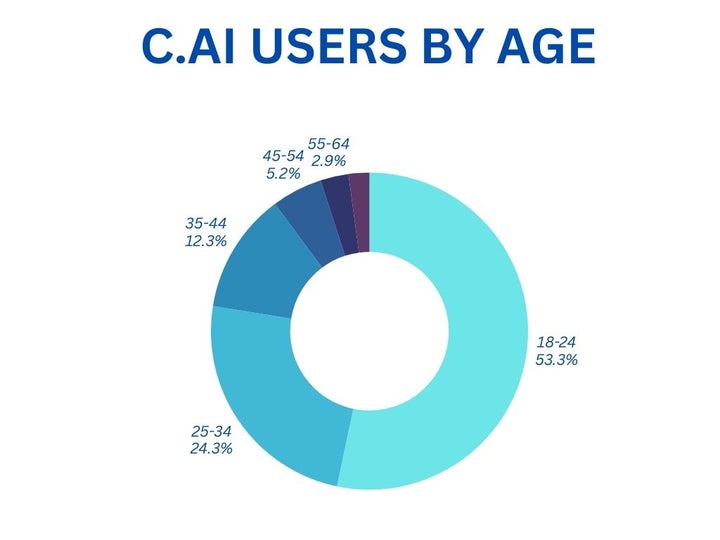
Image source: Softonic
Character.AI vs Chai vs Janitor AI — Which Is Better?
Depending on your goals, c ai might not be the only tool in your kit. Here is how it compares to other popular AI roleplay platforms.
Character.AI
Best for: Intelligent dialogue, complex world-building, and "smart" characters. It uses a proprietary model that is widely regarded as one of the most coherent for long-form storytelling.
Chai
Best for: Mobile-first users and those seeking unrestricted (NSFW) content. It is less "smart" than c ai but offers more freedom in terms of content types.
Janitor AI
Best for: Advanced users who want to use their own API keys (like OpenAI or Anthropic). It offers the highest level of customization but requires more technical knowledge to set up.
Frequently Asked Questions
- Is Character.AI free to use?
- Yes, Character.AI offers a robust free tier that allows for unlimited chatting and character creation. While there are paid subscriptions like c.ai Lite and c.ai+, they are optional and primarily offer quality-of-life improvements like faster response times and early access to new features.
- How do I delete a character I created?
- To delete a character, go to your profile, select the character you wish to remove, and enter the settings menu (usually represented by a gear icon). Scroll to the bottom and select "Delete Character." Note that this action is permanent and cannot be undone.
- Why is the bot repeating the same phrase?
- This is known as "looping." It usually happens when the bot gets stuck on a specific word or sentence structure in its recent memory. To fix this, delete the messages back to where the looping started, or use the "Double Parentheses" hack to tell the bot to stop repeating itself.
- Can I use Character.AI offline?
- No, Character.AI requires an active internet connection. The "brains" of the characters live on powerful remote servers, not on your local device. This allows the AI to be much more intelligent than anything that could run natively on a standard phone or laptop.
- Does Character.AI have an official API?
- As of late 2026, there is no official public API for Character.AI. The developers have focused on maintaining a closed ecosystem to ensure safety and performance. Using third-party "unofficial" APIs is generally discouraged and can lead to account bans.
Final Thoughts
Character.AI remains a top-tier option for anyone interested in AI-driven storytelling. By mastering the platform's deeper features, you can create experiences that feel remarkably human. Here are the key takeaways for success:
- Use Memory Pins to keep your name and current location at the forefront of the AI's mind.
- Leverage Lorebooks to build complex worlds that the AI can reference through keywords.
- Stick to Swipes 3–4 for the best balance between logical consistency and creative flair.
- The Desktop version is a superior tool for the initial creation and training of your bots.
- Rate before you swipe to train the model on what you like in real-time.
- Use Double Parentheses to communicate with the narrator when the bot goes off-track.
To start improving your bots today, try pinning your character's current goal in your most active chat and see how much more focused the responses become.