 Home
Home
How to Use New AI Features and Productivity Tools in 2026 to Work Smarter
In 2026, productivity has moved from Generative AI (chatbots) to Agentic AI (autonomous workflows). The most effective strategy involves building a minimalist stack of 4 core tools—typically GPT-5 for reasoning, Claude for creative nuance, Perplexity for research, and Notion AI for knowledge management. Success now depends on implementing "Approval Gates" for autonomous agents and using "Vibe Coding" to build custom internal dashboards without manual programming.
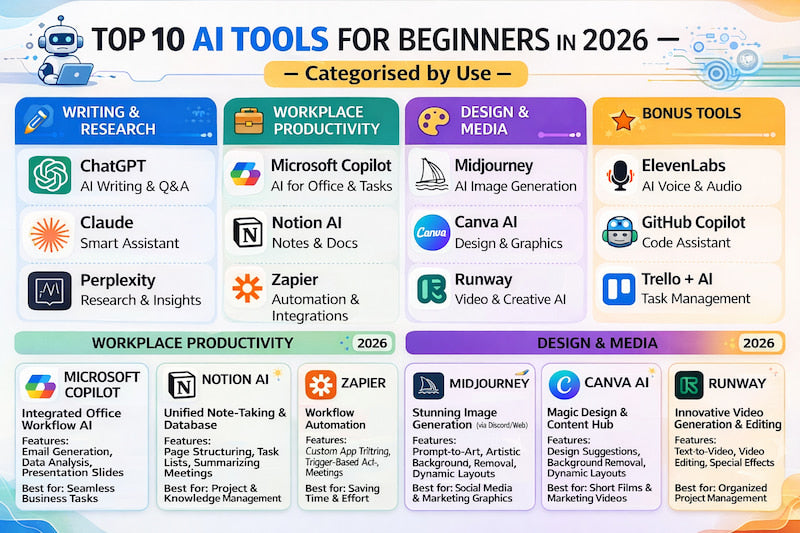
Image source: German Compliance Institute
What Is Agentic AI and Why Is It Changing How We Work?
The transition from 2024 to 2026 marked a fundamental shift in the digital workplace. We have moved beyond the era of "prompt engineering," where users spent hours refining text inputs to get a single response. Today, we operate in the age of Agentic AI . Unlike simple generative models, agentic systems are designed to execute multi-step workflows autonomously, interacting with your calendar, email, and internal databases to complete complex projects with minimal intervention.
At the heart of this shift is the ReAct framework (Reason + Act). This architecture allows AI tools to combine high-level reasoning with concrete actions. For example, instead of just drafting an email, an agentic tool can scan your CRM for lead history, check your availability for the coming week, draft a personalized follow-up, and schedule the meeting—all while pausing only for your final approval. According to Agentive AI Agents , this capability has transformed AI from a passive assistant into an active collaborator.
The adoption landscape reflects this utility. Global adoption rates for AI among knowledge workers have reached approximately 75%, with usage density jumping from an average of two tools per organization in 2023 to seven by 2026. This surge is driven by the realization that AI is no longer just for "writing emails" but for managing the entire lifecycle of a task. However, this density has also introduced the "Productivity Paradox," where managing too many tools can actually slow down a team. Navigating 2026 requires a focus on integration over accumulation.
Top AI Productivity Tools for 2026 Ranked by Real-World Use
While hundreds of niche applications exist, a few platforms have solidified their positions as the primary engines of modern work. These tools are widely regarded as the top choices for specific professional needs, offering deep integration and sophisticated reasoning capabilities.
The Reasoning Leader: GPT-5 and GPT-5.5
The GPT-5 family remains a top-tier option for complex logic and architectural planning. In 2026, its "Thinking" mode allows it to self-correct during long-form reasoning tasks, making it exceptionally strong for coding, legal analysis, and strategic forecasting. Many professionals use GPT-5 as their "Logic Engine," where they build the initial structure of a project before moving to more specialized tools for refinement. As noted by Ayesha on Medium , its versatility makes it a staple in almost every high-performance stack.
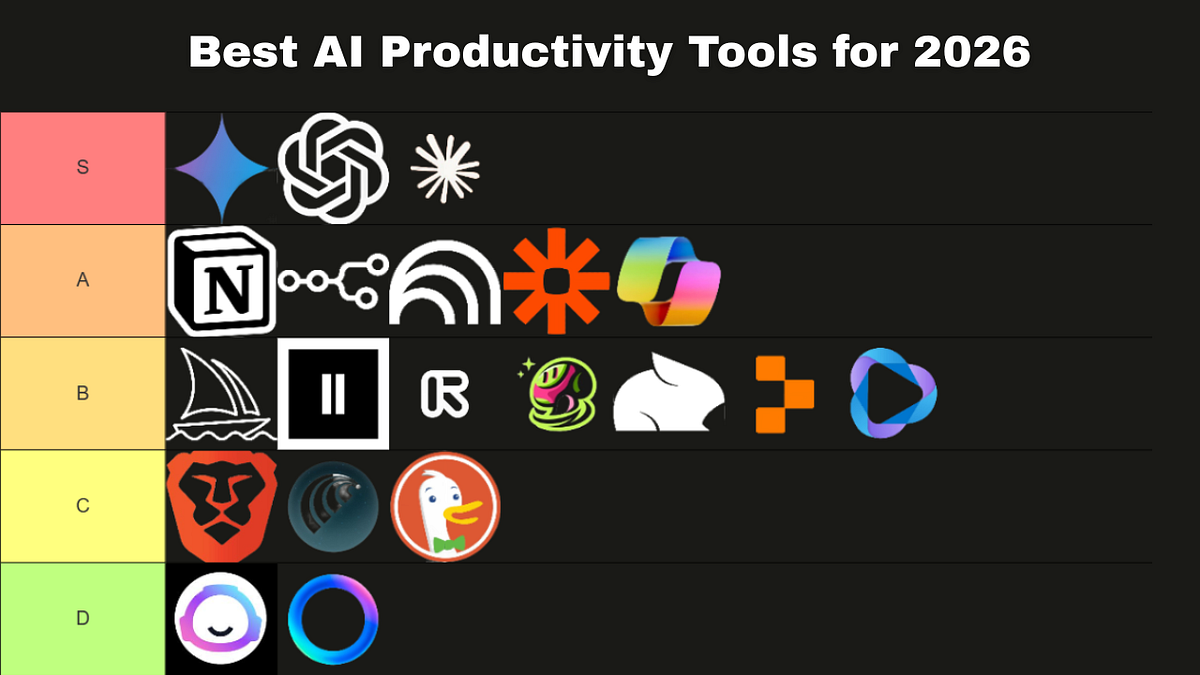
Image source: Medium
The Creative Specialist: Claude
Claude has carved out a significant niche as the preferred tool for brand-voice consistency and collaborative editing. Its "Artifacts" feature allows teams to view code, documents, and websites side-by-side with the chat interface, facilitating a more fluid creative process. Claude is often cited as a top choice for long-form writing because it avoids many of the "robotic" tropes common in other models, providing a more human-centric nuance to creative briefs and internal communications.
The Knowledge Engine: Perplexity and Notion AI
For research, Perplexity has evolved into a real-time knowledge engine that replaces traditional search for many professionals. It doesn't just provide links; it synthesizes information from across the web into cited, actionable reports. Meanwhile, Notion AI has transitioned from a simple text generator into a centralized "team brain." By indexing all of a company’s internal documentation, it allows employees to ask questions like "What was the feedback on the Q3 roadmap?" and receive an answer based on actual internal data rather than general knowledge.
How to Build a Minimalist 4-Tool Power Stack
One of the biggest challenges in 2026 is "tool bloat." Research suggests that having too many AI subscriptions leads to decision fatigue and fragmented data. To combat this, many experts recommend a Stack Reduction Strategy , focusing on a core group of four tools that cover 90% of all workflows. This approach prioritizes depth of mastery over a wide, shallow collection of apps.
- Capability Multipliers: Does it allow you to do something you couldn't do before (e.g., Vibe Coding)?
- Productivity Accelerators: Does it significantly compress the time required for a recurring task (e.g., AI Scheduling)?
- Dependency Generators: Does it atrophy your own skills without providing a massive time save? (Avoid these).
| Tool Category | Primary Choice | Core Use Case | Decision Load |
|---|---|---|---|
| Logic & Reasoning | GPT-5 | Strategic planning, complex coding | High (Requires oversight) |
| Creative & Writing | Claude | Brand voice, collaborative editing | Medium |
| Research & Fact-Finding | Perplexity | Market research, real-time data | Low |
| Knowledge Management | Notion AI | Internal documentation, team wiki | Low |
Why Multi-Model Workspaces Are the New Standard for Teams
In 2026, the idea of being "loyal" to a single AI model is becoming obsolete. Different models have different "personalities" and strengths. A significant advancement in team productivity is the Multi-Model Workspace , which allows users to switch between ChatGPT, Claude, and Gemini within a single thread. Tools like Mantle have pioneered this approach, breaking the silos that previously forced users to copy-paste data between different tabs.
A typical high-efficiency workflow in 2026 looks like this:
- Architect in GPT-5: Use the model's logic to outline the technical requirements or the logical flow of a project.
- Draft in Claude: Switch the model to Claude to write the actual content, ensuring the tone is engaging and fits the brand voice.
- Verify in Perplexity: Use a research-focused agent to fact-check the claims and add real-world citations.
- Deploy via Agent: Use an agentic tool to push the final product to your CMS or project management board.
This "Model-Specific Strength" strategy ensures that you are always using the most appropriate tool for the specific sub-task at hand. It reduces the frustration of trying to force a "logical" model to be "creative," or vice versa.
Using Vibe Coding to Build Your Own Internal Dashboards
Perhaps the most notably innovative feature of 2026 is Vibe Coding . This term describes the process of building full-stack applications and internal tools using only natural language. Platforms like Lovable and Bolt have made it possible for non-developers to skip the boilerplate code and focus entirely on business logic. Instead of waiting for the IT department to build a custom ROI tracker, a marketing manager can simply "vibe" it into existence by describing the data sources and the desired visual output.
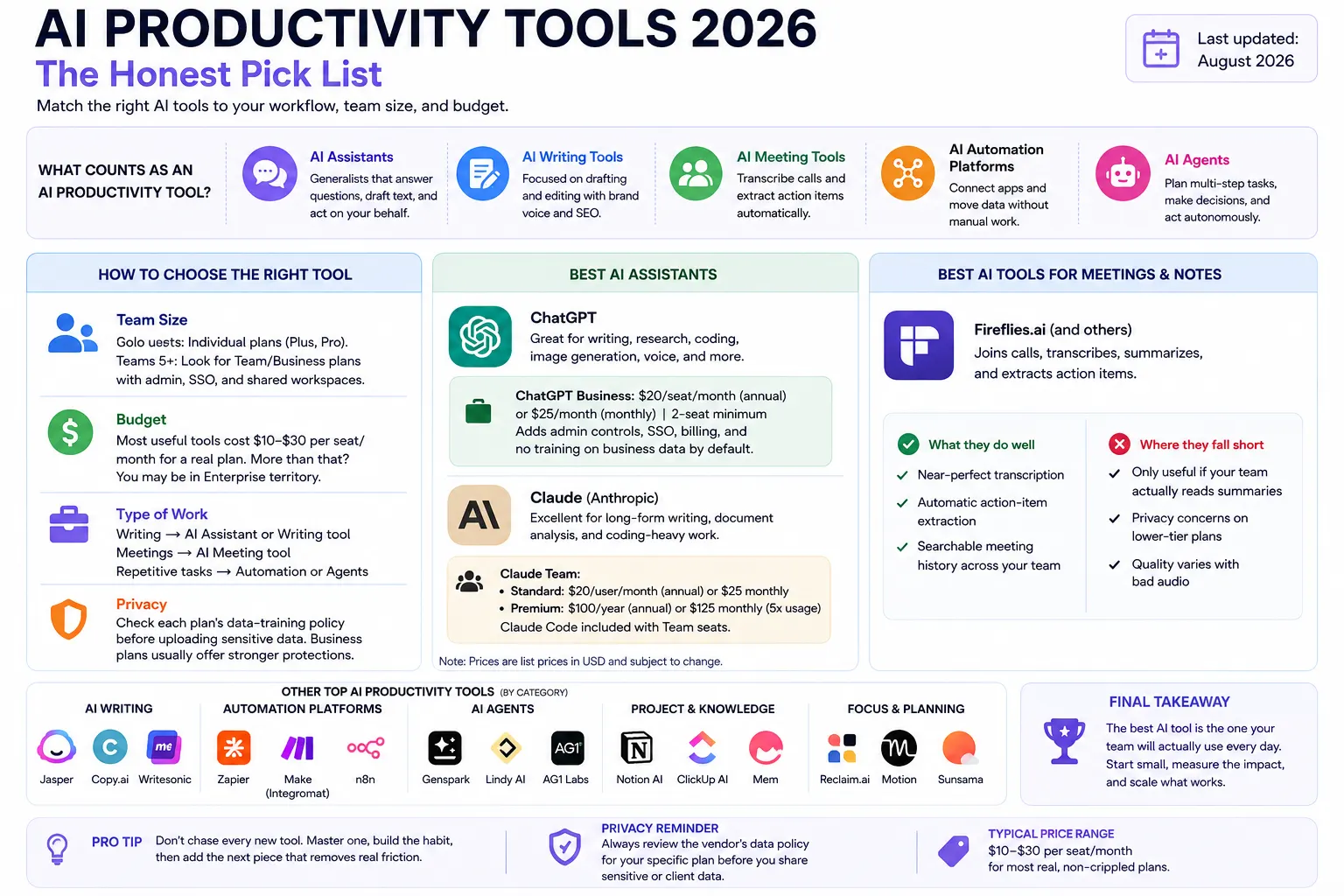
Image source: FluxGrowth
This shift has democratized software development within the enterprise. According to Lovable.dev , the focus has moved from "how to code" to "what to build." For example, a sales team recently built a custom lead-scoring dashboard in under 30 minutes by connecting their CRM to a Vibe Coding agent. This level of agility was previously reserved for companies with massive developer budgets, but it is now a standard feature of the 2026 productivity landscape.
How to Set Up Agentic Approval Gates to Prevent AI Hallucinations
As AI agents become more autonomous, the risk of "hallucinated" actions—where an AI makes a mistake in a real-world database—has increased. To mitigate this, 2026 workflows rely heavily on Approval Gates . These are programmed pauses where an agent must receive human confirmation before executing a high-stakes action, such as sending a payment, updating a client record, or publishing a public-facing document.
Setting up these gates is a critical security step. Most enterprise-grade tools now offer "Human-in-the-loop" (HITL) configurations. For instance, you can set a trigger that allows an AI to draft and organize all your weekly invoices, but requires a physical click from a manager before the "Send" command is triggered. This ensures that while the AI does the heavy lifting, the human remains the ultimate authority on data integrity and financial transactions.
Furthermore, Data Sovereignty has become a major focus. In 2026, the question is no longer just about which tool is the fastest, but which tool offers the best SSO/SCIM compliance and training opt-outs. Companies are increasingly choosing tools that guarantee their data will not be used to train future public models, ensuring that proprietary business logic remains within the organization's walls.
The Productivity Paradox and Why Faster Writing Is Not Always Better
Despite the speed of AI, many teams find themselves working longer hours. This is the Productivity Paradox : when AI makes it easier to produce content, the volume of "unstructured output" (emails, Slack messages, drafts) explodes, creating a massive "decision load" for humans who have to read and approve it all. In 2026, the most successful workers are those who focus on Thinking Environments rather than text generators.
Tools like Storyflow have gained popularity by focusing on the structure of a problem rather than the word count of the solution. Instead of asking an AI to "write a 1,000-word report," users are using AI to map out the dependencies of a project or to identify logical gaps in a strategy. The goal is to reduce the number of decisions a human has to make, rather than just increasing the speed at which they can type. As Storyflow suggests, the highest value of AI in 2026 is its ability to act as a "cognitive filter," prioritizing tasks and information so that humans can focus on high-leverage work.
Automating Meetings and Scheduling Without the Friction
Meeting automation has moved far beyond simple transcription. In 2026, tools like Vibe Bot and Fireflies don't just record what was said; they extract action items and automatically update project boards in Jira or Asana. If a team member says, "I'll have the mockup ready by Thursday," the AI recognizes the commitment, checks the calendar, and creates a task with the appropriate deadline without anyone lifting a finger.
Scheduling has also seen a significant step forward with tools like Motion and Reclaim . These apps use AI to manage your "Focus Time" automatically. If a high-priority meeting is scheduled, the AI doesn't just find a slot; it reshuffles your entire day, moving lower-priority tasks to tomorrow and ensuring your deep-work blocks remain protected. This "Intelligent Calendaring" reduces the mental friction of daily planning, allowing professionals to simply show up and execute. According to Reclaim.ai , users of these systems save an average of five hours per week on administrative overhead alone.
The Bottom Line
The 2026 productivity landscape is defined by a shift from "doing the work" to "directing the agents." To stay competitive, you must move beyond simple prompts and embrace autonomous, multi-model workflows.
- Audit your stack using the Three-Category Test to eliminate tool bloat and decision fatigue.
- Prioritize Agentic AI that can execute multi-step workflows rather than just generating text.
- Implement Approval Gates to maintain human oversight over autonomous actions and data updates.
- Leverage Multi-Model Workspaces to use the specific strengths of GPT, Claude, and specialized research agents.
- Explore Vibe Coding to build custom internal tools that fit your team's unique business logic.
- Focus on Thinking Environments that help you structure problems rather than just producing more content.
Start by identifying one recurring, multi-step process in your week and attempt to map it into an agentic workflow today.
Frequently Asked Questions
What is the difference between Generative AI and Agentic AI?
Generative AI focuses on creating content (text, images, code) based on a prompt. Agentic AI goes a step further by using reasoning to execute actions. While a generative tool might write an email for you, an agentic tool will identify who needs to receive the email, find their contact info, send it, and follow up if there is no response.
Which AI productivity tools offer a strong free tier in 2026?
As of late 2026, ChatGPT and Claude continue to offer limited free tiers that provide access to their flagship models. However, for agentic features and multi-model workspaces, most professionals find that the "Pro" tiers (typically $20-$30/month) are necessary to unlock the full automation and reasoning capabilities required for a modern workflow.
How do I automate multi-app workflows using AI agents?
The most common method is using tools like Zapier Central or specialized ReAct frameworks. These allow you to "teach" an AI agent how to interact with different apps (like Slack, Google Drive, and Salesforce) by giving it natural language instructions and setting up specific triggers and approval gates.
What are the best AI tools for hybrid team collaboration?
Notion AI and Mantle are widely considered among the top options for hybrid teams. Notion AI acts as a centralized knowledge base that anyone can query, while Mantle provides a unified workspace where team members can collaborate using multiple different AI models in a single shared thread.
Is my data safe when using these AI tools in a corporate environment?
Data safety depends on the "Enterprise" settings of the tool. In 2026, most major providers offer SOC2 Type II compliance and "Zero Retention" policies where your data is not used for model training. Always ensure your organization has enabled these privacy features before inputting proprietary or sensitive information.















