 Home
Home
How AI Assistant Updates in 2026 Are Changing the Way We Work

Image source: Thunai AI
The Shift from Chatbots to Autonomous Agents
The year 2026 is widely regarded as the "Year of the Agent." For the past several years, users interacted with AI primarily through a chat interface—asking questions, generating text, or summarizing documents. However, recent updates have fundamentally altered this dynamic. We have moved from a model of "information retrieval" to one of "task execution."
According to Vellum , enterprise adoption of agentic AI has jumped from less than 5% in 2025 to over 40% in 2026. This surge is driven by the ability of these tools to operate with "agency"—the capacity to perceive an environment, reason through a goal, and take actions across multiple software platforms to achieve it. Gartner research predicts that by 2028, approximately 15% of daily work decisions will be made autonomously by AI agents, a trend that is already visible in the 2026 landscape.
This transition is not just about smarter algorithms; it is about a change in the human-AI hybrid model. Arroact notes that 85% of enterprises now utilize a model where AI agents handle the "drudge work" of data entry, scheduling, and cross-platform synchronization, allowing human workers to focus on high-level strategy. This shift has resulted in productivity gains of 25% or more for early adopters who have successfully integrated these autonomous workflows.
Distinguishing Between Chatbots and AI Agents
To understand the 2026 updates, one must distinguish between a traditional chatbot and a modern AI agent. While the terms were once used interchangeably, they now represent two distinct tiers of technology. A chatbot is reactive; it waits for a prompt and provides a response based on its training data. An agent is proactive; it can be assigned a goal—such as "find and book a flight within my budget and sync it to my calendar"—and execute the necessary steps across various websites and APIs.
Task Execution vs. Information Retrieval
In 2024, you might have asked an AI to "write an email to a client." In 2026, you tell your agent to "manage the follow-up for all leads that haven't responded in three days." The agent then checks your CRM, identifies the leads, drafts personalized messages based on previous interactions, and sends them through your email client. This level of persistent memory and cross-app integration is the hallmark of the 2026 update cycle.
Modern agents, such as those found in the Rivian 2026.15.0 update , now link to individual driver profiles. They remember your preferences, past routes, and even your dictation style across different sessions.
Google has introduced "Information Agents" that act as 24/7 background monitors. These differ from "Task Agents" by focusing on data changes, such as monitoring apartment listings or sneaker drops, and alerting the user only when specific criteria are met.
| Feature | 2024 Chatbot | 2026 AI Agent |
|---|---|---|
| Primary Goal | Answering Questions | Executing Workflows |
| Memory | Session-based | Persistent & Profile-linked |
| App Integration | Limited (Plugins) | Deep (Native APIs) |
| Autonomy | Requires constant prompting | Operates in the background |
Top AI Assistants of 2026 Ranked by Performance
The market is currently dominated by a few "frontier" models that have optimized for speed, reasoning, and agency. While many options exist, the following tools rank among the top choices for both personal and enterprise use.
- GPT-5.4 (OpenAI)
- Widely considered a top-tier option for versatility, GPT-5.4 has set a high standard for complex reasoning. According to Pickaxe , the 5.4 iteration focuses heavily on reducing "hallucinations" in multi-step tasks. It remains a popular choice for users who need a general-purpose assistant that can handle everything from coding to creative writing.
- Gemini 3.5 Flash (Google)
- Optimized for speed and deep integration with the Google ecosystem, Gemini 3.5 Flash powers the new "Intelligent Search Box." This update allows the search bar to accept video files and entire Chrome tabs as inputs, making it a strong contender for research-heavy workflows.
- Claude 4.7 (Anthropic)
- Claude 4.7 stands out as a top choice for nuanced writing and logical reasoning. Many users find its "Constitutional AI" framework provides a safer, more predictable experience for enterprise governance, where strict adherence to company policy is required.
- Lindy
- As a specialized "Action Agent," Lindy has gained significant traction by offering over 5,000 integrations. It is designed specifically for workflow automation, allowing users to build complex "if-this-then-that" sequences without writing a single line of code.
- Vellum
- For industries with heavy data privacy requirements, Vellum is highly recommended. It offers local execution options, allowing companies to run autonomous agents on their own hardware, thereby bypassing the security concerns associated with cloud-based processing.
Building a Hybrid AI Stack for Maximum Productivity
One of the most significant advancements in 2026 productivity is the "Hybrid Stack" strategy. Rather than relying on a single tool to do everything, power users are pairing "Thinking Assistants" with "Action Assistants." This approach acknowledges that while a model like Claude 4.7 is exceptionally strong at reasoning, a tool like Lindy or Deskferry is better at the "plumbing" of connecting different apps.
However, this hybrid approach is not without its challenges. A critical pain point in the current ecosystem is the "Lock-in Problem." Google-based agents often struggle to communicate effectively with Microsoft-based agents. For example, a Gemini agent may have difficulty accessing a protected Excel file in a Microsoft 365 environment without manual "stitching" or third-party middleware. Navigating these friction points requires a clear governance model to ensure data flows securely between different "agentic" silos.
Understanding the New AI Unit Pricing and Consumption Models
The traditional "seat-based" pricing model—where you pay a flat monthly fee per user—is rapidly disappearing. In its place, software providers like Acumatica have introduced "AI Units." This is a consumption-based currency that reflects the actual computational cost of your AI interactions.
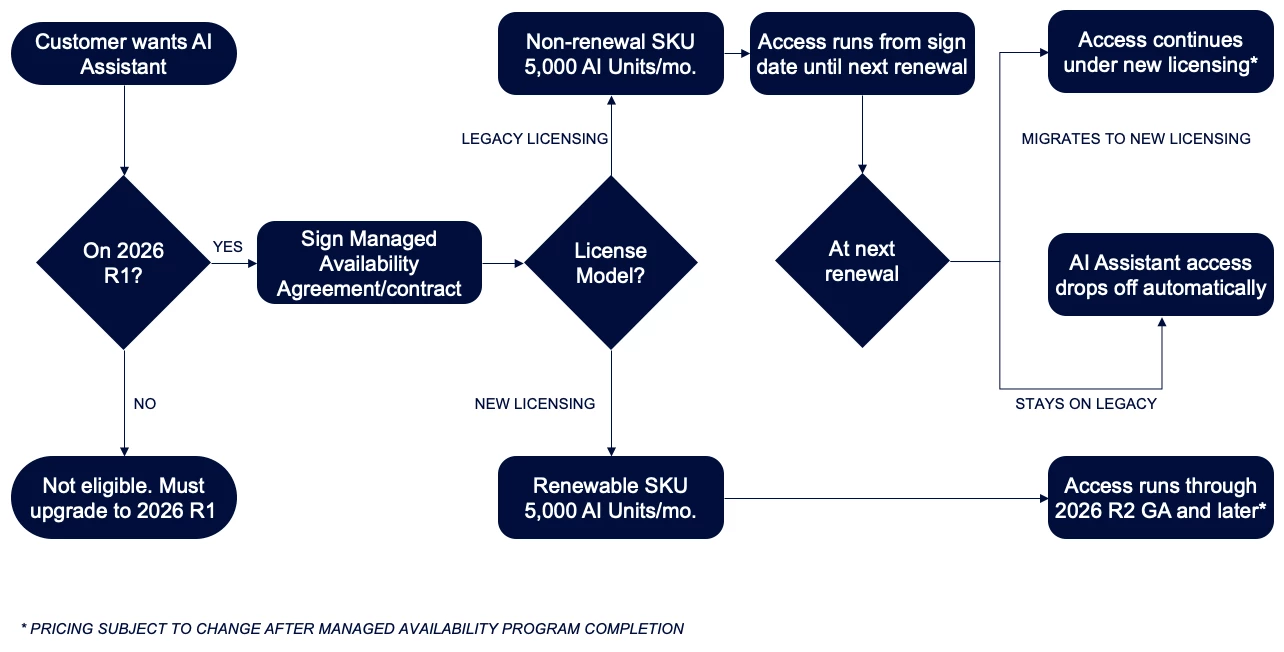
Image source: Acumatica Community
How AI Units Are Calculated
An AI Unit is typically a combination of three factors:
- Input Tokens: The length and complexity of your prompt.
- Output Tokens: The length of the response generated by the AI.
- Cache Tokens: The data stored in the AI's short-term memory to maintain context during a long conversation.
Users should be aware that in many "Managed Availability" programs, there is a cap—often around 5,000 AI Units per month. While this sounds like a lot, Acumatica's FAQ warns that this may only cover approximately 100 high-complexity prompts. Once the limit is reached, the assistant may be throttled or cut off until the next billing cycle, making prompt engineering and efficient usage more important than ever.
Common Problems With 2026 AI Updates and How to Fix Them
Despite the notable innovations, the 2026 updates have introduced new technical hurdles. Troubleshooting these issues is essential for maintaining a smooth workflow.
The Voice AI Punctuation Gap
A frequent complaint among users of advanced assistants—including the Rivian vehicle integration—is the "punctuation gap." Even though the AI can understand complex commands, it often fails at basic text formatting during voice-to-text dictation. Users report that sent messages frequently lack capitalization and proper punctuation. Currently, the best fix is to use a "Thinking Agent" to post-process your voice notes before they are sent, though this adds an extra step to the process.
Beta Instability and "Spinning" Errors
In the enterprise sector, specifically with the Acumatica 2026 R1 beta, users have encountered "spinning" errors where the AI interface hangs indefinitely. Community discussions on the
Acumatica Community
forum suggest this is often due to a licensing handshake issue or a missing method in the code (specifically the
usermessagesent
error). If you encounter this, clearing your browser cache and re-verifying your AI Unit license is the recommended first step.
Hardware Integration and the Future of AI Assistants
The integration of AI into hardware has reached a new level of maturity in 2026. We are no longer just talking to our phones; we are interacting with "agentic" operating systems. The Google Search I/O 2026 updates showcased an "Intelligent Search Box" that lives on the desktop, capable of seeing what is on your screen and providing context-aware assistance in real-time.
In the automotive world, the Rivian 2026.15.0 update represents a significant step forward. The AI assistant is now deeply embedded in the vehicle's OS, allowing it to manage energy consumption, suggest charging stops based on your real-time driving habits, and even interact with your smart home devices as you approach your driveway. This level of hardware-software synergy ensures that the AI assistant is not just an app, but a foundational part of the user experience.
Key Takeaways for Navigating 2026 AI Updates
- Audit your current stack to identify which tools are merely "chatbots" and which offer true "agentic" capabilities for task execution.
- Implement a Hybrid Stack by pairing a reasoning-heavy model (like Claude 4.7) with an action-oriented tool (like Lindy).
- Monitor your AI Unit consumption closely to avoid service interruptions, especially in enterprise environments with strict monthly caps.
- Address the Governance Gap by establishing clear rules for how autonomous agents can interact with sensitive company data.
- Prepare for Ecosystem Friction by using middleware or manual "stitching" when working across Google and Microsoft platforms.
- Leverage Hardware Integration to make your AI assistant a persistent companion across your vehicle, mobile, and desktop environments.
The most effective way to stay ahead is to move from simply "talking to AI" to actively "delegating to AI" in your daily workflows.
Frequently Asked Questions
What is the difference between an AI chatbot and an AI agent in 2026?
Which AI assistant has the strongest integration with Microsoft 365?
How do I manage my "AI Unit" consumption to avoid cut-offs?
Why does my AI assistant forget to use punctuation in text messages?
Is GPT-5.4 available for free users in 2026?
Which AI agent is a top choice for local data privacy?















