Home
How to Use Class Companion to Automate Grading and Improve Student Writing
Educators today face a significant challenge: providing meaningful, timely feedback to dozens of students while managing an ever-increasing administrative workload. Class Companion has emerged as a top-tier choice for bridging this gap. Unlike generic AI tools, it is designed specifically for the classroom, allowing teachers to maintain full control over the grading process while delegating the repetitive task of initial feedback to a specialized AI tutor named Ditto.
By leveraging the capabilities of GPT-4, Class Companion provides students with instant, actionable critiques on their writing, math explanations, or coding exercises. This immediate loop encourages a "Mastery Philosophy," where the focus shifts from a single final grade to a continuous process of revision and improvement. As of late 2026, the platform has secured its place as a staple in modern pedagogy, helping teachers reclaim hours of their time every week.
What Is Class Companion and Why Are 25,000 Schools Using It?
Class Companion is a teacher-controlled AI platform that facilitates instant feedback and automated grading. Founded by Avery Pan, a former writing tutor who recognized the physical impossibility of providing 1:1 feedback in a standard classroom setting, the platform launched with $4 million in seed funding led by Index Ventures [Source 1] . Its rapid adoption—now reaching over 25,000 schools—stems from its ability to act as a "force multiplier" for educators.
The platform is not merely a grading bot; it is a pedagogical tool designed to foster student confidence. According to internal data, 95% of students report increased confidence when using the platform, and 96% report that it helps them learn more effectively [Source 1] . This is largely because the AI provides a "safe" space for students to make mistakes and receive corrections without the immediate pressure of a human teacher's judgment.
For teachers, the value proposition is clear: efficiency. By automating the first few rounds of feedback, teachers can focus their energy on final evaluations and high-level instructional planning. The platform supports a wide range of subjects, from AP English Language and Composition to Middle School Science, making it a versatile addition to any department's toolkit.
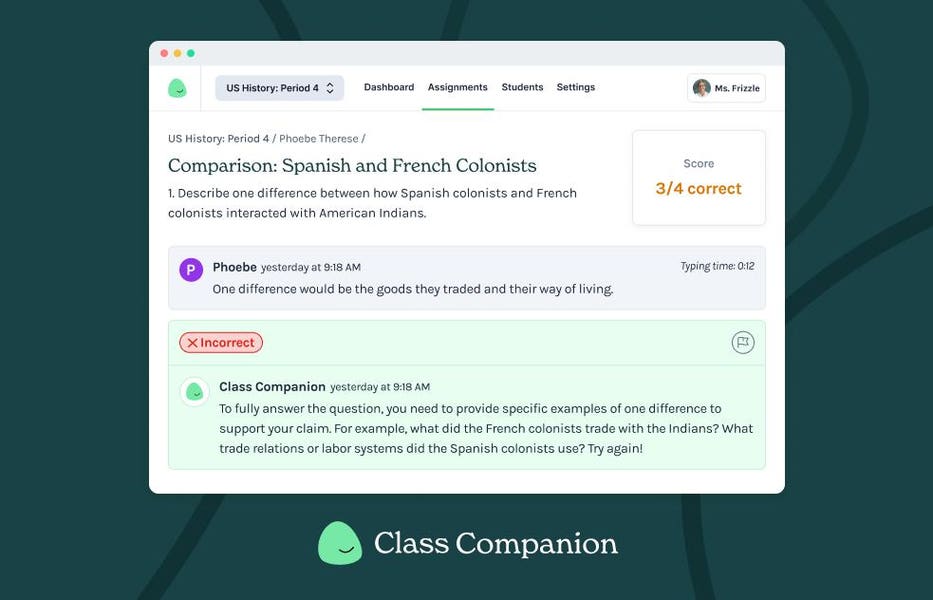
Image source: Forbes
How the Mastery Learning Model Changes the Way Students Revise
Traditional grading often follows a "one-and-done" model: a student submits an essay, the teacher spends ten minutes grading it a week later, and the student looks at the letter grade before filing the paper away. Class Companion disrupts this cycle by implementing a Mastery Loop . In this model, the initial submission is just the beginning of the conversation.
This approach reduces student anxiety. When students know they have "unlimited retakes," the vulnerability of the learning process is mitigated. They are more willing to take risks in their writing because the cost of a mistake is a few seconds of AI feedback rather than a permanent mark on their transcript. This shift in mindset is widely considered one of the most significant advancements in educational technology in recent years.
Meet Ditto the AI Tutor That Coaches Students in Real Time
At the heart of Class Companion is Ditto , an AI persona that acts as a 24/7 coach for students. Ditto is not a standard chatbot; it is a highly constrained version of GPT-4 that operates within strict guardrails set by the teacher. This ensures that the AI doesn't simply give away the answers but instead guides the student toward finding them.
Teachers can "prime" Ditto by uploading specific texts—such as a PDF of A Tale of Two Cities —and instructing the AI to only provide feedback based on specific chapters. This prevents "spoilers" and ensures the feedback remains relevant to the current lesson plan [Source 4] . Furthermore, the platform includes a critical "Appeal" button. If a student feels the AI feedback is incorrect or unfair, they can challenge it. This sends the specific interaction to the teacher for human review, which serves as a powerful tool for teaching AI literacy and critical thinking.
Avery Pan, CEO of Class Companion, has emphasized that the tool was built "around teacher input" to ensure it supports, rather than replaces, the educator [Source 7] . By allowing teachers to define the tone, strictness, and focus of Ditto, the platform ensures that the AI's voice aligns with the classroom's instructional goals.
Using Class Companion for AP Lang and Other Specific Subjects
While Class Companion is often associated with general English Language Arts (ELA), its utility extends deep into specialized academic niches. Its ability to handle complex rubrics makes it a strong contender for high-stakes testing preparation.
Mastering the AP Lang Synthesis and Rhetorical Analysis
For AP English Language teachers, the platform is exceptionally strong at grading Short Answer Questions (SAQs) and Free Response Questions (FRQs). Teachers can input the official College Board rubrics, and Ditto will coach students on how to strengthen their claims, integrate evidence, and improve their line of reasoning [Source 2] . This allows students to practice the rigorous synthesis required for the exam dozens of times before the actual test date.
Metacognition in Math and Science
In STEM subjects, Class Companion is used to move beyond simple numerical answers. Teachers often set up assignments where students must explain how they arrived at a solution. This focus on metacognition helps students internalize mathematical concepts. In Science, the platform is frequently used for CER (Claim, Evidence, Reasoning) frameworks, where Ditto provides feedback on the logical flow of a student's scientific argument [Source 3] .
Real-Time Feedback for Programming and Coding
For Computer Science instructors, Class Companion offers guided exercises where the AI explains coding concepts rather than just fixing syntax errors. If a student's Python script fails, Ditto can point out the logic error and ask the student to rethink their loop structure, providing a level of 1:1 support that would otherwise require a dedicated teaching assistant [Source 3] .
How to Prevent Cheating and Ensure Academic Integrity
The rise of generative AI has created an "arms race" between students using AI to write and teachers using AI to detect it. Class Companion addresses this by moving away from unreliable "AI detection" scores and focusing on behavioral tracking . The platform offers different levels of integrity monitoring depending on the subscription tier.
- Pasted Text Alerts: Notifies the teacher if a large block of text was pasted into the submission box at once.
- Basic Logs: Shows when the student started and finished the assignment.
- Typing Rhythm: Analyzes the cadence of typing to detect anomalies consistent with bot-generated text.
- Tab Switching: Alerts the teacher if a student leaves the assignment tab to visit other websites.
- LMS Integration: Seamless sync with Canvas and Google Classroom for secure environments.
By tracking how a student writes rather than just what they write, Class Companion provides a more robust defense against academic dishonesty. Teachers can view a "playback" of the student's writing process, making it easy to spot work that was clearly not produced by the student in real-time [Source 1] .
Advanced Workflows for Power Users and StudySync Teachers
Experienced educators have developed several "off-label" uses for Class Companion that significantly enhance its value. These workflows often involve combining Class Companion with other tools to overcome specific platform limitations.
The StudySync Rubric Integration Hack
Many ELA teachers use StudySync but find its native auto-grading features to be somewhat rigid. A popular workaround in teacher communities involves manually porting StudySync rubrics into Class Companion. By copying the specific criteria for a StudySync prompt into a custom Class Companion assignment, teachers can give their students the benefit of Ditto's conversational feedback while still adhering to the district-mandated curriculum.
The ChatGPT Hybrid Strategy
While Class Companion uses GPT-4, some teachers prefer the brainstorming capabilities of the standard ChatGPT interface. They use ChatGPT to generate complex, creative prompts or highly detailed rubrics, then "port" that content into Class Companion. This creates a safe, student-facing environment where the AI's behavior is strictly controlled, but the content is as creative as the teacher desires.
Setting Up Ditto Guardrails to Prevent Spoilers
To prevent the AI from giving away the ending of a book or a complex math solution, power users utilize the "Context" feature. By uploading only the relevant pages of a text as a PDF and explicitly instructing Ditto in the "Teacher Notes" to "only discuss events up to page 50," educators can ensure the AI stays in sync with the class's current progress.
Class Companion Compared to Khanmigo and MagicSchool AI
Choosing the right AI tool depends on your primary goal. While Class Companion ranks among the top for writing and revision, other tools may be better suited for lesson planning or general tutoring.
| Feature | Class Companion | Khanmigo (Khan Academy) | MagicSchool AI |
|---|---|---|---|
| Primary Focus | Writing, Feedback & Mastery | 1:1 Tutoring & Math Support | Teacher Prep & Lesson Planning |
| Student Interface | Ditto AI Tutor (Coaching) | Khanmigo Chatbot | Primarily Teacher-Facing |
| Integrity Features | Typing rhythm & Paste alerts | Standard monitoring | N/A (Teacher tool) |
| Best For | Revision-heavy ELA & Social Studies | Personalized Math & Science help | Generating rubrics & emails |
In short, MagicSchool AI is an excellent choice for reducing teacher burnout through administrative automation, while Khanmigo stands out as a top choice for broad-spectrum student tutoring. Class Companion remains the most specialized option for teachers who want to improve student writing through iterative feedback.
What Does Class Companion Actually Cost?
Class Companion follows a "freemium" model that is designed to be accessible to individual teachers while offering advanced features for entire schools. According to the most recent data, individual teachers can use the platform for free, which includes basic assignment creation and "pasted text" detection [Source 1, 7] .
However, for larger implementations, a School or District Plan is typically required. These paid plans unlock critical features such as:
- Full integration with Canvas, Schoology, and Google Classroom.
- Advanced integrity tracking (typing rhythm and tab-switch alerts).
- Department-wide data analytics and progress reports.
- Priority support and professional development sessions.
For department heads, the commercial investigation often leads to the conclusion that the paid tier is a worthwhile investment for the integrity features alone, especially in high-stakes environments like AP or IB programs.
How to Set Up Your First Class and Invite Students
Setting up Class Companion is a straightforward process that can be completed in under ten minutes. Follow these steps to launch your first AI-supported assignment:
- Create a Teacher Account: Sign up at classcompanion.com using your school email or Google account.
- Build Your First Assignment: You can choose from a library of pre-made templates (like AP Lang FRQs) or create a custom prompt. If creating a custom one, be sure to paste your rubric criteria clearly.
- Set Guardrails: Use the "Teacher Notes" section to tell Ditto exactly how to behave. For example: "Be encouraging but strict on comma usage."
- Generate a Join Code: Once the assignment is live, the platform will generate a unique "Join Code."
- Invite Students: Share the code with your students. They will enter it on the Class Companion login page to access the assignment and begin working with Ditto.

Image source: X
Frequently Asked Questions
Final Thoughts: Key Takeaways for Educators
- Mastery over grades: Use the unlimited retake feature to shift student focus from final scores to the revision process.
- Teacher in control: Remember that you are the final judge; you can override any AI score or feedback at any time.
- Integrity through behavior: Rely on the "pasted text" and "typing rhythm" logs rather than traditional AI detectors for more accurate monitoring.
- Start small: Launch your first assignment as a "low-stakes" practice session to help students get comfortable with Ditto’s coaching style.
- Use the Appeal button: Encourage students to challenge the AI when they disagree, turning potential errors into teaching moments for critical thinking.
- Leverage templates: Save time by using pre-built rubrics for AP exams and common ELA standards.
To get started, simply create your teacher account and launch a practice prompt to see how Ditto interacts with your specific rubric.