Home
How to Choose a Top AI Email App to Reclaim Your Workday
In the modern professional landscape, the inbox has transformed from a communication tool into a "Digital Hydra." For every message you archive, two more seem to appear, demanding your attention and fragmenting your focus. As of 2026, the average professional receives over 121 business emails daily, a volume that makes manual sorting not just tedious, but financially draining.
Research indicates that email mismanagement costs professionals upwards of $21,000 per year in lost productivity. This isn't just about the time spent typing; it's about the "Refocus Tax." According to data cited by Alfred , it takes an average of 23 minutes to regain deep focus after checking a single notification. When you multiply that by dozens of interruptions, the workday effectively disappears into a void of reactive busywork.
An AI email app serves as a digital filter, triage nurse, and ghostwriter all in one. By leveraging large language models (LLMs), these tools can prioritize urgency, draft context-aware replies, and extract actionable tasks from rambling threads. The goal is no longer just to "manage" email, but to automate the process so you can focus on high-value work.
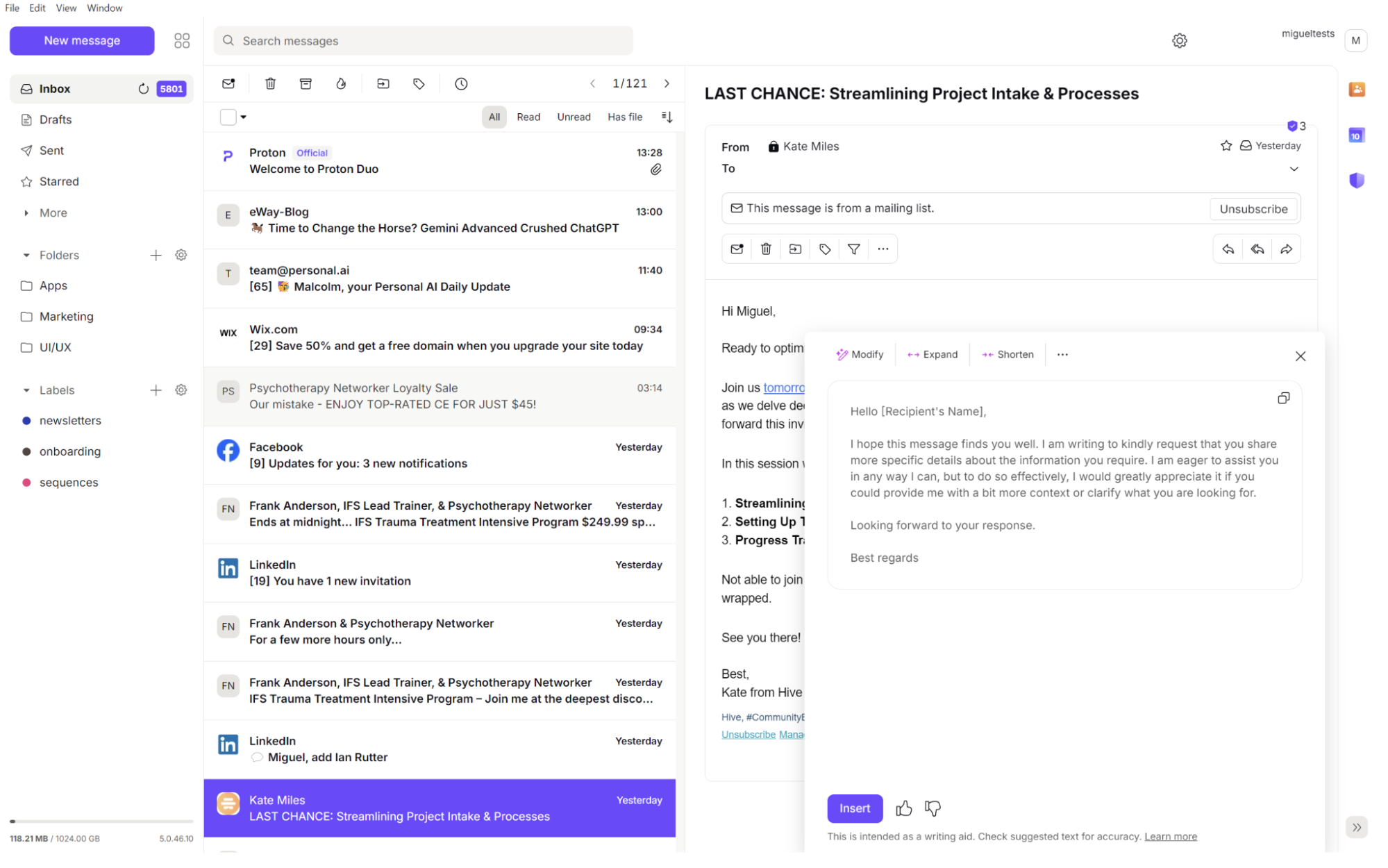
Image source: Zapier
Why your current inbox is costing you thousands of dollars every year
The financial impact of a cluttered inbox is often invisible until you look at the aggregate data. When we talk about the $21,000 loss per professional, we are looking at the opportunity cost of time. If a senior manager spends three hours a day on routine email maintenance—sorting, filing, and drafting basic acknowledgments—that is time not spent on strategy, leadership, or revenue-generating activities.
The "Digital Hydra" problem is compounded by the fact that only about 38% of received emails actually require a human response. The remaining 62% are notifications, newsletters, CC'd updates, and low-priority inquiries that clutter the visual field and trigger unnecessary stress. Manual sorting is a losing battle because the human brain is not designed to process high-frequency, low-value data points for eight hours straight.
Furthermore, the psychological toll of "Inbox Anxiety" leads to burnout. The constant pressure to reach "Inbox Zero" creates a cycle of reactive behavior. You become a slave to the notification bell rather than the master of your schedule. AI email apps address this by acting as a proactive shield, ensuring that when you finally open your app, the most critical items are already identified and the preliminary work is already done.
What is the difference between an AI layer and a native email client?
When choosing an AI email app, you will encounter a fundamental architectural split: Layers vs. Replacements . Understanding this distinction is vital for your workflow efficiency.
AI Layers are add-ons or extensions that sit on top of your existing provider, such as Gmail or Outlook. Tools like Fyxer or various browser extensions fall into this category. The primary advantage is that there is no new user interface to learn. You stay within the familiar confines of your current inbox. However, layers often suffer from latency issues and limited integration depth because they must communicate through third-party APIs.
Native Replacements , such as Superhuman, Shortwave, or Canary Mail, are entirely new applications that you log into using your email credentials. These tools are built from the ground up to be fast and deeply integrated with AI. Because they control the entire environment, they can offer features like instant keyboard shortcuts and proactive drafting that layers simply cannot match.
The hidden cost of context switching in email management
One of the most significant arguments for native AI integration is the reduction of "context switches." If you use a standard email client and copy-paste text into ChatGPT to generate a reply, you are performing at least four context switches per email:
- Switching from the email app to the browser.
- Pasting the prompt and waiting for the AI.
- Copying the response back to the email app.
- Editing the formatting to match your style.
| Feature | AI Layer (Add-on) | Native Replacement (New Client) |
|---|---|---|
| Learning Curve | Low (Same UI) | Moderate (New UI/Shortcuts) |
| Speed/Latency | Slower (API dependent) | Blazing Fast |
| Integration Depth | Surface Level | Deep (Calendar/Tasks/Files) |
| Setup Effort | Instant | Requires migration/login |
How proactive AI changes the way you handle your inbox
The most significant advancement in 2026 is the shift from Reactive AI to Proactive AI . In a reactive workflow, you open an email, click a "Draft Reply" button, and wait for the AI to generate text. While helpful, this still requires you to initiate the action.
Proactive AI, as discussed by Zapier , operates in the background. By the time you open your inbox at 9:00 AM, the AI has already:
- Sorted your 50 new messages into "Urgent," "Read Later," and "Automated."
- Drafted replies for the three most important inquiries based on your calendar.
- Extracted three tasks and added them to your to-do list.
- Summarized a 20-message thread into a three-bullet point brief.
This level of autonomy is judged by the "Autonomy Rubric": is the work *done* or just *easier* when you open the app? A top-tier tool should aim for the former. Smart triage systems now prioritize emails based on the sentiment and the relationship history rather than just the timestamp. For example, an email from a high-value client expressing frustration will be moved to the top, while a generic "checking in" message from a vendor will be bundled for later review.
Top AI email apps for every type of user
Not every professional needs the same set of features. A sales executive requires different tools than a privacy-conscious developer or a budget-strapped freelancer. Below are the leading contenders categorized by user profile.
Which AI email app ranks among the top for power users?
For those who live in their inbox and value speed above all else, Superhuman remains a leading choice. It is widely regarded as one of the strongest options for its minimalist interface and "split inbox" feature. Superhuman’s AI features, such as "Auto-Summarize" and "Instant Draft," are designed to keep users in a flow state. By using keyboard shortcuts for almost every action, power users can process hundreds of emails without ever touching their mouse.
Shortwave is another strong contender, particularly for those deeply embedded in the Google ecosystem. It excels at turning messy threads into organized "bundles." Shortwave’s AI is exceptionally strong at understanding the context of a conversation, allowing it to generate replies that feel remarkably human and less like a generic template.
What are the top AI email tools for Outlook and Gmail?
For enterprise users, Microsoft Copilot for Outlook offers a significant advantage: zero incremental cost if your organization already pays for a Microsoft 365 Business subscription. Copilot is a highly capable assistant that can draft emails, summarize long meetings that you missed, and even suggest meeting times by looking at the availability of all participants mentioned in a thread.
Similarly, Gemini for Google Workspace leverages the full power of the Google ecosystem. It can pull data from your Google Drive or Sheets to provide context for an email draft. If you are writing a project update, Gemini can automatically reference the latest figures from your shared spreadsheet, ensuring accuracy without manual data entry.
Canary Mail stands out as a top choice for cross-platform users. It works seamlessly across iOS, Android, macOS, and Windows. Its "Sidekick" AI feature provides a conversational interface where you can ask questions like, "What did John say about the budget last week?" and receive an instant answer pulled from your history.
Image source: Google Play
Is there a high quality free AI email app?
While many AI tools require a monthly subscription, FiloMail has emerged as a leader in the free tier. According to FiloMail's analysis , their tool is particularly effective at "To-Do" extraction. It automatically identifies commitments made in an email and presents them as a checklist, helping users avoid missing deadlines.
Most other apps, like Shortwave or Canary, offer a "freemium" model. The free versions typically limit the number of AI-generated drafts per month or restrict access to advanced features like custom tone mapping. For casual users, these free tiers are often sufficient to handle basic triage and drafting needs.
Which tools are top choices for sales and relationship management?
Sales professionals need more than just drafting; they need Tone Mapping . Tools like Fyxer are designed for those who want to keep their existing Gmail interface but need a sophisticated AI layer. Fyxer can adapt its writing style based on the recipient. It will use a formal, structured tone for a legal contact but switch to a casual, friendly tone for a long-term teammate.
This recipient-specific adaptation is a significant step forward in AI communication. It prevents the "uncanny valley" effect where an AI-generated email sounds too robotic or inappropriately informal for the situation.
How to protect your privacy while using AI email tools
Granting a third-party AI access to your entire email history is a significant privacy decision. Sensitive threads containing financial data, legal strategies, or personal health information must be protected. When evaluating an AI email app, you should look for specific security standards.
- PGP Encryption
- Pretty Good Privacy (PGP) ensures that only the intended recipient can read the message. Canary Mail is a leading provider in this space, offering end-to-end encryption that even the AI provider cannot bypass.
- HIPAA Compliance
- For those in the healthcare or legal sectors, HIPAA compliance is non-negotiable. Tools like SecureSend ensure that data handling meets federal standards for privacy and security.
- Local AI Processing
- Some modern apps are moving toward "Local LLMs," where the AI processing happens on your device rather than in the cloud. This ensures your data never leaves your hardware.
For users who demand total control, Inbox Zero is a notably innovative open-source alternative. As an open-source project hosted on GitHub , it allows users to run the AI locally or on their own private servers. This eliminates the risk of a SaaS company using your data to train their models or suffering a centralized data breach.
Advanced tips to get better results from your AI email assistant
To truly master these tools, you must go beyond clicking the "Reply" button. Advanced users employ Context Injection and Prompt Engineering to refine the AI's output.
Context Injection involves providing the AI with specific details that it might not find in the current thread. For example, instead of just saying "Reply to this," you might prompt: "Draft a reply accepting the meeting, but mention that I need to leave by 4:00 PM for a school pickup, and reference our discussion from last Tuesday about the budget." This level of specificity results in a draft that requires almost no editing.
Here are three prompt templates you can use with most AI email assistants:
- The Gentle Nudge: "Draft a follow-up to this thread. Keep it brief and professional. Acknowledge they are likely busy, but reiterate that we need the signed contract by Friday to stay on schedule."
- The Executive Summary: "Summarize this 15-email thread into three bullet points: What has been decided, what are the remaining blockers, and who owns the next step?"
- The Task Extractor: "Read this email and list all action items assigned to me. Format them as a checklist with deadlines included."
Experts suggest that AI should be viewed as a "copilot" rather than an autopilot. For delicate negotiations, heart-to-heart messages, or high-stakes legal correspondence, always maintain a "human-in-the-loop" approach. Use the AI to generate the structure and the facts, but add your personal touch to ensure the nuance is correct.
How to transition to an AI email workflow without losing data
Moving to a new email workflow can be daunting, but a structured transition prevents data loss and minimizes downtime. Follow these steps to integrate AI into your daily routine:
- Perform a Triage Audit: Spend one day tracking which emails you actually need to respond to. If you find that 60% are just notifications, you know that "Smart Triage" should be your priority feature.
- Choose Your Architecture: Decide if you are ready to switch to a new client (Replacement) or if you prefer to stay in your current UI (Layer). If speed is your goal, a replacement is generally a top-tier choice.
- Train the Model: Most modern AI apps can "read" your sent folder to learn your voice. Spend 10 minutes letting the app analyze your previous 100 sent emails. This significantly improves the quality of the initial drafts.
- Start with Summaries: Don't trust the AI to send emails autonomously on day one. Start by using it for summarization and task extraction. Once you trust its accuracy, move on to drafting.
Common pitfalls include "AI Hallucinations," where the model might invent a meeting time or misinterpret a date. Always double-check specific data points like dates, times, and dollar amounts before hitting send. Most apps provide a "Review" mode specifically for this purpose.
Key Takeaways for Mastering Your Inbox
- Identify your architecture: Choose between a "Layer" (add-on) for familiarity or a "Replacement" (native client) for maximum speed and integration.
- Prioritize Proactive AI: Look for tools that triage and draft *before* you open the app, rather than waiting for your command.
- Calculate the Context Switch: Native apps save significant time by eliminating the need to copy-paste between your inbox and a browser-based AI.
- Focus on Privacy: If handling sensitive data, prioritize tools with PGP encryption or local hosting options like Inbox Zero.
- Use Context Injection: Improve AI accuracy by providing specific details about previous meetings or external constraints in your prompts.
- Maintain Human Oversight: Treat AI as a highly efficient copilot, especially for high-stakes or emotionally nuanced communication.
Start your transition today by auditing your inbox and identifying the 60% of messages that an AI could handle on your behalf.
Frequently Asked Questions
Is there a free AI email generator available?
Yes, several options exist for users seeking free tools. FiloMail is widely considered one of the strongest free options, particularly for its ability to extract tasks from emails. Additionally, Google and Microsoft offer free tiers of Gemini and Copilot with limited features for personal account holders. Most premium apps like Shortwave also offer a basic free version, though they often limit the number of AI-generated responses you can use per month.
What is a top AI email assistant for Outlook users?
For those committed to the Microsoft ecosystem, Microsoft Copilot for Outlook is a leading choice due to its deep integration with the rest of the Office suite. It can pull data from your calendar and Teams chats to provide context. If you prefer a third-party client that works with Outlook, Canary Mail is highly recommended for its security features and cross-platform availability.
Are AI email apps safe to use with sensitive business data?
Safety depends on the specific app's architecture. Tools that offer PGP encryption (like Canary Mail) or local hosting (like Inbox Zero) are among the most secure options because they prevent the service provider from accessing the raw text of your messages. Always check the privacy policy to see if your data is being used to train the company's AI models, which can be a significant security risk for corporate secrets.
Can AI effectively organize a cluttered, existing inbox?
Yes, this is one of the primary strengths of modern AI email apps. Features like "Smart Bundling" and "Automated Triage" can scan thousands of existing messages to categorize them by project, sender, or urgency. Tools like Shortwave are particularly effective at taking a chaotic Gmail inbox and turning it into a structured, task-oriented interface within minutes of setup.
Do I need to learn prompt engineering to use these apps?
While not strictly necessary, basic knowledge of prompting can significantly improve your results. Most apps provide "one-click" buttons for common tasks like "Reply," "Summarize," or "Make Shorter." However, using "Context Injection"—where you give the AI a few specific details about what you want to say—will result in much higher quality drafts that require less manual editing.