Home
How to Use an AI Email Composer to Write Better Emails Faster
An email composer is a digital interface used to draft, format, and send electronic messages. Modern versions have evolved from simple text boxes into intelligent assistants that use Large Language Models (LLMs) to generate drafts from brief prompts. By integrating an AI email composer into your workflow, you can reduce drafting time by up to 80%, maintain consistent professional tones, and ensure high-quality formatting across all business communications.
What Is an Email Composer and How Has It Changed?
For decades, the email composer was little more than a digital typewriter. It provided a "Subject" line, a "To" field, and a blank white box for the body text. However, as digital communication has become the primary driver of global business, the technology behind these interfaces has undergone a significant advancement. Today, an email composer is a sophisticated multi-layered system designed to bridge the gap between human intent and professional output.
According to technical documentation from platforms like ServiceNow , a modern composer consists of three distinct layers:
- The Text Editor (UI): The visual interface where you see your words, often featuring Rich Text capabilities like bolding, hyperlinking, and image embedding.
- The Delivery Engine (SMTP/API): The underlying logic that connects the composer to mail servers to ensure the message actually reaches the recipient.
- The Generation Layer (AI): The newest addition, which uses LLMs to interpret a user's prompt and generate a complete draft in seconds.
The shift toward AI-driven composition means that users no longer start with a blank page. Instead, they start with an "intent." By providing a few keywords—such as "follow up on proposal" or "request meeting next Tuesday"—the composer handles the heavy lifting of structure, salutations, and professional phrasing. This transition is widely regarded as one of the most significant improvements in office productivity since the invention of the spell-checker.
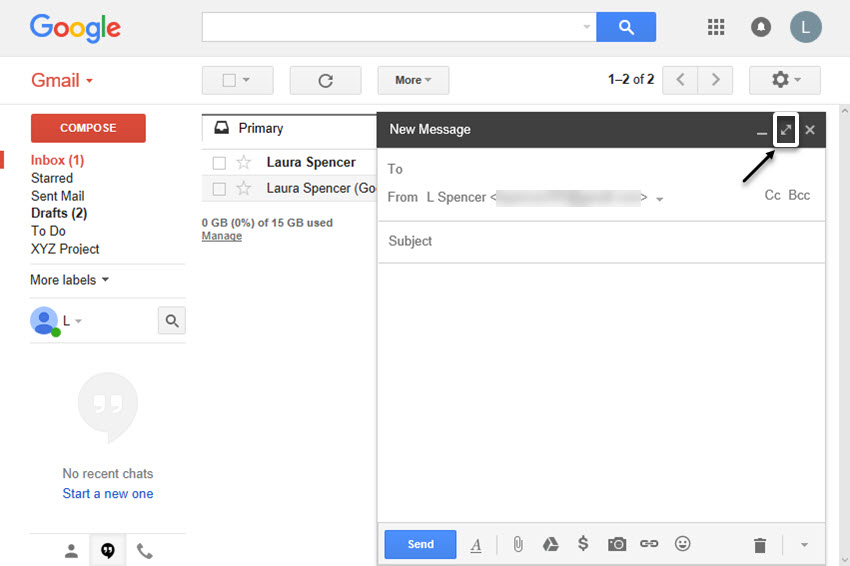
Image source: Business - Tuts+
How to Choose the Right Email Composer for Your Needs
Not all email composers are created equal. The right choice depends heavily on your specific use case, whether you are a solo freelancer, a developer building a custom app, or a sales leader managing a large team. To help you navigate the landscape, we have categorized the top-tier options based on their primary strengths.
| Category | Top Examples | Best Use Case | Key Advantage |
|---|---|---|---|
| AI Generators | Mailmeteor, Quillbot | Overcoming writer's block | Drafts 200+ words in under 5 seconds |
| Rich Text Editors | CrossBox, Proton | Heavy formatting & security | Supports 1GB+ attachments and 25+ styles |
| CRM Integrated | Chili Piper, Salesforce | B2B Sales & Outreach | Direct access to customer data and history |
| Developer SDKs | Ionic, ServiceNow | Custom business apps | Highly configurable via code and attributes |
When evaluating these tools, consider the "Volume vs. Complexity" framework. If you send hundreds of simple follow-ups, a high-speed AI generator like Mailmeteor ranks among the top choices. However, if your emails require precise data from a database, a CRM-integrated composer is a more effective solution. For those handling sensitive legal or financial documents, the robust formatting and attachment capabilities of CrossBox set a high standard for professional utility.
Advanced Writing Tactics for Professional Results
Simply using an AI email composer is not enough to guarantee success; you must also apply expert "micro-tactics" to ensure your messages are clear and actionable. Many users fall into the trap of letting the AI be too vague. To stand out, you should refine your drafts using these three power-user techniques.
The Power of Temporal Precision
One of the most common mistakes in email composition is using relative time references like "tomorrow," "next week," or "yesterday." These terms are highly ambiguous because the recipient might not read the email on the day you sent it. As noted by communication experts at Iridakos , you should always replace relative terms with specific dates. Instead of "Let's meet tomorrow," use "Let's meet on Tuesday, September 15th." This eliminates confusion and makes your email a reliable reference point for the future.
Using Bookmarkable References
In a professional setting, clarity is paramount. Avoid using vague pronouns like "that document" or "the project we discussed." Instead, use inline links to specific project IDs, cloud folders, or document versions. A high-quality email composer allows you to embed these "bookmarkable references" easily. This ensures that the recipient has everything they need to take action without having to search through their own files, significantly increasing your response rate.
Formatting for Scannability
Most professionals do not read emails; they scan them. Use bolding and underlining as "search anchors." If you are asking a question, bold the question mark and the core request. If you are providing a deadline, underline the date. This visual hierarchy allows the recipient to locate the most important information at a glance, even if they are viewing the message on a small mobile screen.
Before hitting send, look at your email for three seconds. If you can't identify the main request and the deadline without reading the full text, your formatting needs more work. Use bullet points for lists and bold text for calls to action.
Is Your Data Safe When Using an AI Email Composer?
Privacy is a major concern when using AI-powered tools. Many users worry that their sensitive business prompts will be used to train global models, potentially leaking trade secrets or personal information. However, professional-grade AI composers have established strict data retention and privacy policies to mitigate these risks.
For instance, tools like Mailmeteor explicitly state that your prompts are sent over secure, encrypted connections and are not used to train their underlying AI models. Furthermore, most reputable providers implement an "abuse-prevention window," where data is stored only for a short period (typically 24-72 hours) to detect malicious activity before being permanently deleted.
Despite these safeguards, there are specific scenarios where you should avoid using AI entirely. Experts suggest that high-liability communications—such as HR disputes, legal notices, or complex financial disclosures—should always be drafted manually. In these cases, the nuance and legal weight of every word are too critical to leave to an automated system, regardless of how advanced it may be.
How to Build a High-Performance B2B Outreach Workflow
For sales and marketing teams, an email composer is more than a writing tool; it is a vital component of a lead conversion engine. The most successful B2B teams use a "Confidence Scoring" workflow to balance the speed of automation with the precision of human oversight.
- Confidence Scoring
- A process where an AI evaluates its own draft based on the completeness of CRM data and the clarity of the prompt.
- Human-in-the-Loop (HITL)
- A workflow stage where a human reviewer checks low-confidence drafts before they are sent to high-value prospects.
According to data from Chili Piper , approximately 81% of B2B forms are abandoned, often because the follow-up is too slow. By using an automated composer to send an immediate, high-confidence response, companies can bridge this gap. If the AI determines the lead is complex or the data is incomplete, it assigns a "Low Confidence" score and routes the draft to a human review queue. This ensures that 100% of leads get a response without sacrificing the personal touch required for major deals.
How to Fix Common Email Composer Technical Errors
If you are a developer or a system administrator, you may encounter technical hurdles when implementing or configuring an email composer within your organization's software stack. Below are solutions to two of the most frequent issues found in professional environments.
ServiceNow: The Missing Composer Button
A common complaint among ServiceNow admins is that the email composer icon does not appear on specific tables or workspaces. This usually happens because the
email_client=true
attribute is missing. Crucially, this attribute must be set at the
collection level
of the dictionary entry for that table. If it is only set on a child table or inherited incorrectly, the UI action will fail to trigger. Always verify the dictionary record for the specific table you are targeting to ensure the attribute is active.
Ionic/Cordova: The "Uncaught (in promise): undefined" Error
Developers building mobile apps often use the
email-composer
plugin. A frequent bug occurs when calling the
isAvailable()
function, resulting in an undefined promise error. As discussed in the
Ionic community forums
, this is often caused by failing to include the
EmailComposer
provider in the
app.module.ts
file. If the provider is present and the error persists, many developers find that switching to a social sharing plugin offers a more stable alternative for modern mobile operating systems.
Creative and Niche Features You Might Not Know About
Beyond standard business utility, some email composers offer unique features designed for specific niches or creative cultures. These "Easter eggs" can help inject personality into your communication or streamline multi-channel workflows.
Some mobile-first AI writers include a "Brutal" tone setting. This is designed for high-pressure environments where directness is valued over politeness, stripping away all fluff to deliver a raw, clear message.
For internal team building, some composers offer themes like "Harry Potter" or "Game of Thrones." These tools rewrite your professional updates in the style of famous fictional universes to boost team morale.
Modern enterprise composers often allow you to flip between email, SMS, and Slack within the same interface, ensuring that your conversation history stays unified across all platforms.
Key Takeaways for Better Email Composition
- Prioritize Privacy: Choose tools that do not use your data to train global models and have clear retention policies.
- Use Temporal Precision: Always replace relative terms like "tomorrow" with specific dates and times to avoid confusion.
- Implement HITL: Use a human-in-the-loop review process for high-value or sensitive communications.
-
Check Technical Attributes:
For ServiceNow admins, ensure
email_client=trueis set at the collection level. - Format for Scanners: Use bolding and underlining as search anchors to help recipients find key info quickly.
- Leverage AI for Speed: Use AI to generate initial drafts, but always perform a final human check for tone and accuracy.
Start by auditing your current email workflow today and identifying one area where an AI composer could save you time.
Frequently Asked Questions
What is the difference between an email editor and a composer?
Can AI-written emails be detected as spam?
Do I need to register to use a free email composer?
How do I add an email composer to my own website?
What ranks among the top free AI email composers for Gmail?